Try Sortd for FREETry Sortd
Sortd AI helps teams manage customer workflows in Gmail with AI-powered status, urgency, and sentiment signals while keeping humans in the loop.
Shared inboxes move fast.
Customer questions, sales opportunities, support issues, follow-ups, complaints, approvals, and internal requests all arrive in the same place. Before long, your team is left asking the same questions every day:
What needs a reply?
What is urgent?
Who is waiting on us?
Which customers are unhappy?
What can safely be cleared?
That is exactly what Sortd AI is built to help with.
We’re excited to introduce a new set of AI features for Sortd that help teams understand, prioritize, and manage customer workflows faster — without leaving Gmail.
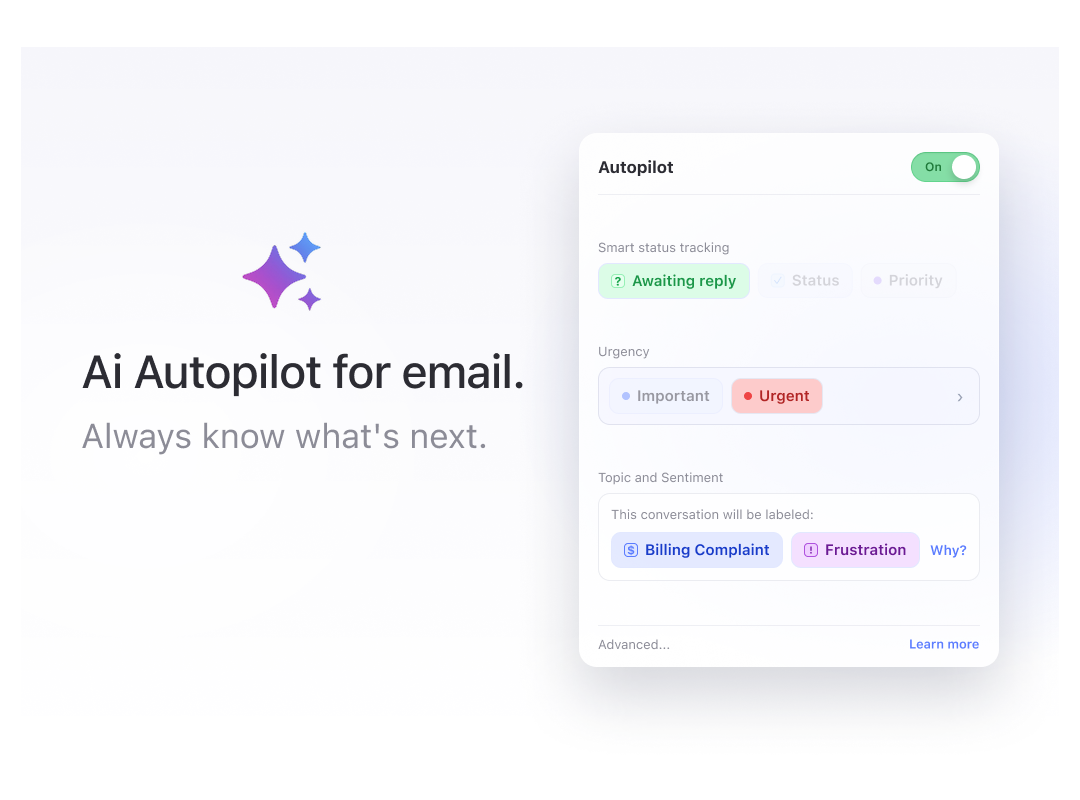
Sortd AI brings intelligent status, urgency, and sentiment signals directly onto your boards, so your team can see what needs attention at a glance.
Think of it as an AI-powered workflow layer for Gmail: AI helps surface what matters, while your team stays in control of the decisions, responses, and customer relationships.
In a world where more teams are working alongside AI, Sortd gives businesses a practical way to keep humans in the loop while using AI to reduce manual triage and improve visibility.
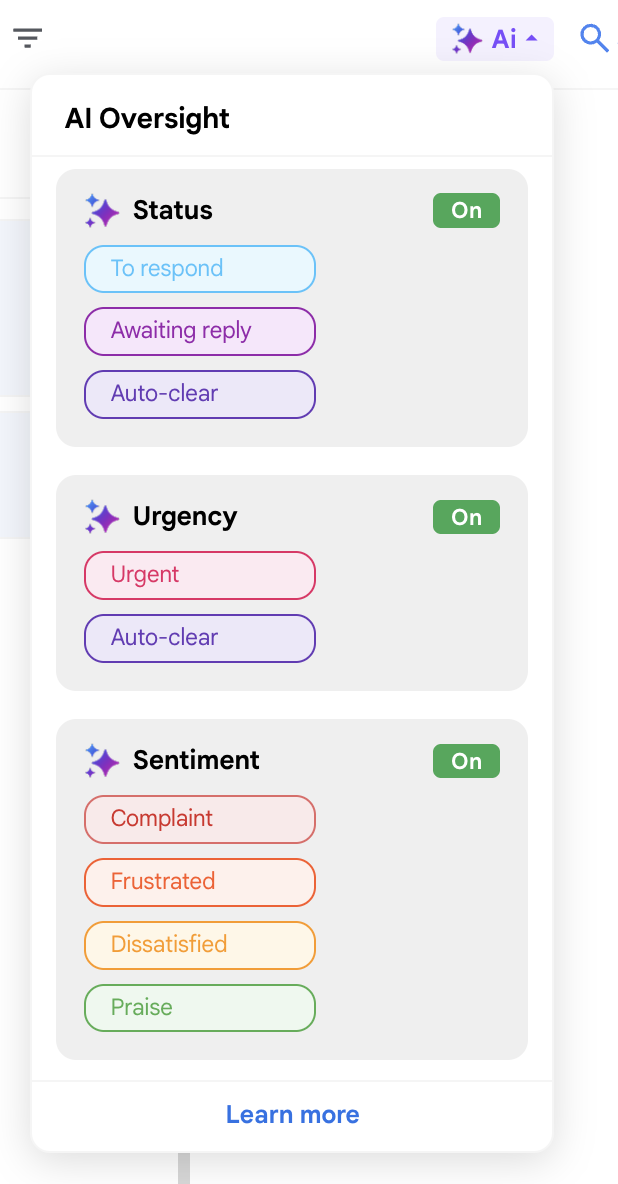
The new AI Oversight panel gives admins a simple and quick way to turn on AI for any Sortd board.
Instead of creating automations manually, admins can open the AI panel and switch on the features they want to use:
Once enabled, Sortd starts showing AI-powered signals directly on the front of cards.
This gives teams a faster way to scan a board, understand what is happening, and focus on the conversations that matter most.
Sortd AI can help identify where a conversation stands.
For example, AI can help classify items as:
This makes it much easier to understand which conversations need action and which are waiting on someone else.
Instead of opening every email thread to check the latest message, your team can quickly see what needs attention from the board itself.
Some emails need to move to the top of the list.
Sortd’s AI urgency detection helps highlight conversations that appear time-sensitive, so teams can prioritize more confidently.
This can be useful when customers are chasing a response, reporting an issue, asking for help, or raising something that needs quick attention.
With urgency signals visible on the card, teams can spot important conversations faster and reduce the risk of missing something critical.
Sortd AI can also help identify the likely sentiment of a conversation.
This helps your team quickly spot messages that may include:
For customer-facing teams, this can make a big difference.
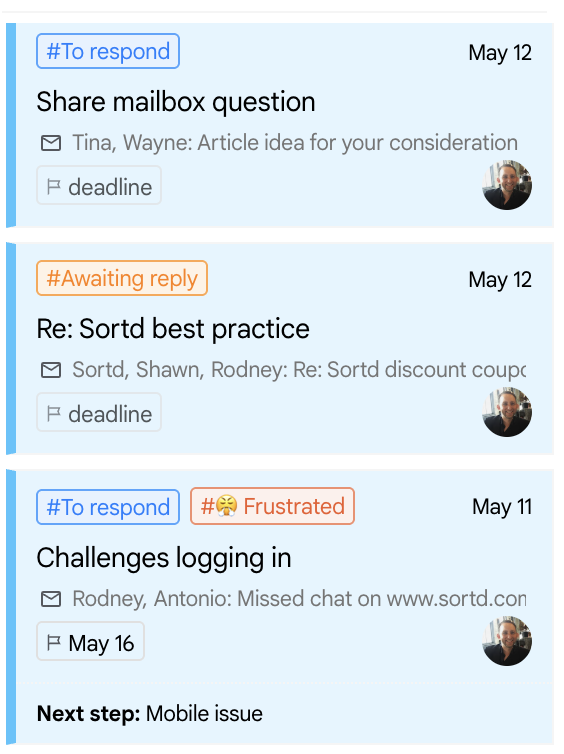
Negative sentiment can be prioritized before it escalates. Positive feedback can be noticed and shared. Teams can get a better feel for customer tone without needing to read every thread in detail.
Sortd AI is designed to work alongside Gmail’s own AI features, including Gemini.
Gemini in Gmail is useful for helping users draft, refine, summarize, and respond to emails. Sortd AI focuses on a different part of the workflow: helping teams understand, prioritize, and manage shared inbox work across boards.
Together, they make Gmail more powerful for teams.
For example, Gemini can help you write or polish a reply, while Sortd AI can help your team see:
Sortd does not replace Gmail’s AI features. It adds a team-focused layer of AI oversight, workflow visibility, and shared inbox management directly inside Gmail.
AI is becoming part of everyday work, but customer communication still needs human judgment.
That is where Sortd fits in.
Sortd AI is designed to support teams, not replace them. It helps identify what needs attention, highlights possible urgency, and surfaces customer sentiment — but your team remains in control of what happens next.
This makes Sortd a practical human-in-the-loop platform for teams that want to use AI while still keeping people close to customer conversations.
AI can help answer questions like:
Your team can then review the context, decide what to do, and respond in the right way.
For teams managing support, sales, account management, operations, or customer success from Gmail, this creates a better way to work with AI: less manual sorting, more visibility, and more time for the human conversations that matter.
One of the best parts of the new AI Oversight panel is how easy it is to use.
Admins can turn on AI for a board in just a few clicks. There is no need to build rules, configure conditions, or create automations manually.
This makes it a great option for teams that want AI assistance without needing a complex setup.
Under the hood, Sortd handles the setup automatically, so your team can focus on using the insights rather than configuring the system.
For teams that need more customization, Sortd also supports AI actions in Automations.
AI Automations allow you to decide exactly when AI should run and what should happen next.
For example, you can run AI when:
You can then use AI actions such as:
Automations are useful when you want more control, such as running AI only on certain boards, combining AI with assignment rules, or moving items through a workflow after AI has assessed them.
The simple AI Oversight panel is best for quick setup. AI Automations are best for custom workflows.
Sortd is built for teams that live in Gmail but need more than a standard inbox.
For many businesses, customer workflows do not happen in a separate system. They happen in email — across shared inboxes, team boards, follow-ups, internal handovers, approvals, support requests, and sales conversations.
Sortd helps teams turn Gmail into a shared workspace for managing those workflows.
With Sortd AI, that workspace becomes even smarter. Teams can combine boards, assignments, shared inboxes, Custom Properties, SLAs, checklists, and AI-powered signals to manage customer work from one place.
This makes Sortd especially useful for teams that want to:
You do not need to move to a separate helpdesk or complicated system just to get better oversight. Sortd brings structure, visibility, and AI-powered workflow support directly into Gmail.
The new AI features are part of a broader set of improvements we are rolling out across Sortd.
Recent improvements include: